Posted on Leave a comment

First yarn dyeing attempt using Kool Aid! – Part 2

So it’s done! We had a beautifully sunny day on Saturday so it was the perfect opportunity to do the dyeing as I didn’t want to completely destroy my kitchen by doing it inside. I set up a dyeing area outside in our garden, laying a bin bag over the table and then covering that with cling film. Here’s the steps I took:

  • Laid the yarn carefully on top of a sink full of tepid water which had a couple drops of washing up liquid in it.
  • Left the yarn to sink to the bottom by itself (about 30 minutes)
  • While the yarn was soaking I prepared the dye by mixing 1 packet of kool-aid per 8oz
  • Once the yarn was soaked through I carefully pressed down on it to get rid of any final bubbles that were trapped within the yarn.
  • Lifted the yarn out of the sink, carefully and gently squeezing the yarn to get rid of some of the water
  • Laid the yarn in a circle on the table
  • Created a very basic guide to help me space the colours properly
  • Took the first colour and poured it wedge-style onto the chosen sections of the circle.
  • Gently rub the mixture through the yarn, lifting and making sure the underneath is coated as well
  • To finish each colour I took the spray gun section of a normal squirty bottle and had it’s end in the measuring jug holding the juice, this way I could carefully and accurately get the remaining spots of white with the colour
  • Work through the rest of the colours in the same way
  • Wrap the yarn in the cling film, folding it over itself so the yarn is separated in layers from the other sections of the yarn (so colour doesn’t mix)
  • Put the whole thing in a microwavable bowl and in the microwave on high for 2 minutes, then rest for 2 minutes and then put it on high for another 2 minutes. You should find the water in the bowl is clear at this point, if not then after a 2 minute rest pop it on high for another 2 minutes.
  • Leave it to cool COMPLETELY. I found this bit very hard to do, I really wanted to unwrap my yarn and see it but if you do there is a chance you’ll felt your yarn and then it will be ruining, so leave it til it’s cooled
  • Fill the sink with water that is the same temperature as your cooled yarn and carefully push your yarn around in it a bit
  • Pull the yarn out, gently sqeezing it and then hang it up to dry

And ta-da… the finished product…


The full process has been put on my flickr here

And on Ravelry you’ll find me as Lacuna 🙂

Posted on Leave a comment

First yarn dyeing attempt using Kool Aid!

So I’ve done it, I’ve just bought some undyed yarn and some kool aid online and both packages should be at my door before the end of next week! I saw so many peoples drool-worthy yarn made with kool aid that I couldn’t hold out any longer. It looks pretty straightforward and there are good tutorials out there for it, not to mention Ravelry and the dye-based groups on there.

So I should have started out simple, but no, I saw a yarn with such beautiful colours (pink, purple, light brown, a bit of grey and a bit of bluey-green) and so loaded up with 7 packages of kool aid and some lovely looking merino sock yarn.

Picture courtesy of Violet Green

Socrates Merino Sock Yarn from Violet Green

I bought the Socrates Merino Sock Yarn from Violet Green and the Kool Aid from KoolaidWorld. I ordered 2 of grape, ice blue raspberry, pink lemonade, and 1 of orange. I am a bit worried as (and it figures even after all the research I did) I just found another article that says to get a vibrant purple (which I want) it is better to use a red + blue instead of just grape… well it’s too late now, I’ve made my order so we’ll see what happens with the grape!

Now I just sit and wait for my deliveries!

Posted on 1 Comment

Recovering my classic mini’s interior

I have a 1992 original mini (lovingly referred to hereafter as ‘Jensen’) which deserved a makeover of his interior. After searching around for interior suppliers for classic mini’s I ran across Classic Core, a mini specialist company in Norfolk. I’m actually located down in Bournemouth, Dorset but they do delivery so it wasn’t a problem. They don’t currently post many prices on their website so I don’t want to say an exact value to what I paid, however I will say that they are very fair and affordable and well worth the quality they provided. If you contact them directly they will give you a cost in nearly no time at all.

I was very impressed with the excellent response time that their customer service replied to me with my many questions, and then again impressed at their turnaround time to deliver my covers to me. I ordered front and rear seat covers, a full set of door cards, the rear wheel-arch covers and also a handbrake and gear shift gaiter. I chose to have mine in a creamy/white colour with blue piping and it looks perfect if I do say so myself, I’m very pleased with the job they’ve done.

Changing the seat covers isn’t very difficult at all, and they even sent me a couple sheets of paper with step-by-step instructions. Here’s a couple of pictures showing the process:

Before/After (although only one front seat done at time of pictures):
Front seats before
Back seats after


Back seats before
Front seats after

More pictures can be seen on my flickr

The other front seat has been put in since, but only one door card due to working late and lots of rain! I will post more pictures once I have got the front door cards in.

Posted on 5 Comments

ViaPost VS Click&Mail
Sending post direct from your computer

ViaPost : Sending email directly from your computer

Click & Mail : Sending post directly from your computer


I received a bit of information about Click&Mail through the post the other day and for once this junk mail actually looked like it might be useful; sending post directly from my computer without having to deal with all the regular and time consuming steps of posting a typical letter. So I thought I would trial it and one of it’s competitors out to see who provides the better service, and this is what I found…

Initial Sign Up and Download of Drivers

ViaPost and Click&Mail both have equally simple websites to register and download the necessary drivers. I did notice however that the Click&Mail website does make it quite clear that you will be able to trial posting a letter whereas the ViaPost website does not, in fact I didn’t even realise I would get some free credit from ViaPost until I had finished registering and installing the driver, more than some people would have done if they weren’t sure they were going to get to try it out before committing some funds to it.

Win: Click&Mail

Printing process
Click&Mail
Driver install onto Windows, no Mac alternative so I’ve installed it onto my Windows VM. Easy, quick and puts itself in the list of printers so you just have to select it like you would a regular printing device. Once you’ve chosen it as your printing option for a document, it loads up a view of where the address needs to be. There is no option to move it about if it’s in the wrong spot or doesn’t fit within it’s red indication box though so if you’ve got the alignment wrong you’ve got to open your document to adjust and attempt to print again.

ViaPost
Driver install option onto Windows. There is also a Mac online version which you can upload your documents to and manage / send them to print that way. I tried both. The uploading process to the online management area was as expected when uploading a document, you can then preview and send when ready. There is the red address box on both the online and driver versions, their address positioning had more potential than Click&Mail’s but it soon turned sour. If you enter an address on your document that runs outside of ViaPost’s desired space for the address it will let you change it within the printing view so that you do not have to go back and do it within the document. I found this a nice experience and I was glad for the ease of ensuring my address fit where they wanted it. However, once I and the program seemed happy with the address fitting within the space allowed, I hit print, only to see that as it processed my document to print it removed quite a bit of the address, including the line with the company name, as if it decided halfway through that the address actually wasn’t acceptable and it will just take out bits as it sees necessary, random lines within the address I might add, leaving me sitting here with a now processed document that debited my account for a letter that might not even reach the recipient. Had they just gone one step further and asked me to approve the automated reduction in the address then I would have been quite pleased with the overall printing procedure from ViaPost.

It would have been an easy win for ViaPost had it not scared me into worrying what will happen to my address when I hit print in the future. I’d rather be secure in knowing and use Click&Mail.

Win: Click&Mail

Costs
Click&Mail are currently charging £0.42 and goes up as you add pages to the document. A very reasonable cost considering that includes the consumables, postage and time you’d otherwise have to incur, with a minimum top-up value of £10

ViaPost prices start at a very cost effective £0.27 and increase as you change it to a colour document or add further pages, with a lower £5 top-up starting point.

Win: ViaPost

Delivery
I have to say that I expected Click&Mail’s letter to arrive about a day before ViaPost’s as on their website’s Click&Mail offer a 2 day service whereas ViaPost is stating that they are currently on a 3 day process although do mention that they are looking to reduce this in the future.

I sent both letters on the evening of 07/07 and didn’t receive the letters (posted to my own address) until 13/07, the fourth business day after sending them. I don’t feel that this is acceptable enough to use for the sending of business post, especially such things as invoices and contracts, which you want to get to the client in a typical 1st class post method.

For this point I am giving ViaPost the win as they at least state on their website that they will take 3 days whereas Click&Mail were 2 business days off their estimate.

Win: ViaPost

Final say…
I really WANT to like ViaPost. It demonstrates an attempt at making the experience more organised, dynamic and it IS the less expensive of the two… however where it tries to surpass Click&Mail’s features is where it lets itself down. In the areas where it tries to be clever it breaks down and does various unexpected things as a result of the cleverness being unable to handle its task, resulting in a miserable and angry user who simply wants it to just WORK and not try to just assume what it is I want.

So although it is a handy service they are both providing, I will still be waiting a bit longer until the posting process is sped up to a dependable 2 day service.

Posted on Leave a comment

My new ‘garden’ space

I’ve wanted to try growing vegetables for a while now but my garden is rather restrictive being only 15ft x 15ft and of that already being fully occupied by flowers, some outdoor storage space and a small table and chairs. I found an allotment conveniently near my house however after enquiring about it found that there is a 2-5 year waiting list 🙁

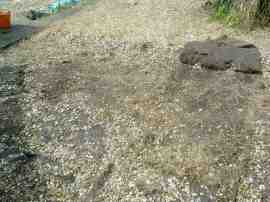
I searched online and found a guy nearby that was offering his un-used garden space behind his house as an allotment-style area for someone and since then have grabbed it up and started to work through it. It’s going to be a rather tough going job as the ground I’ll be working with hasn’t been tended to for quite some time, being laid with tarps in attempt to control the weeds and then gravel being placed over the tarps when they failed to suppress the weeds. The area is approximately 10m x 4m although I think I will just work on a small chunk at a time as I need more and more room for plants.

Here’s two views of the garden after I’d already been working on it for a bit, trying to first clear most of the gravel on the tarps so I could put them off the ground.

The beginnings of the garden

After a days work of weeding, pulling tarps off, finding more weeds under the tarps and then finally starting to upturn the soil, this is what the result so far looks like:
After some work on the garden

The plants shown in the newly dug garden area are from the neighbors that were thinning out their plants and offered some to me. I don’t know if I’ll keep them because I had intended to have a vegetable plot but I have at least stuck them in the ground temporarily so they don’t wilt.

In seed trays at home I have prepared pumpkins, spring onions, broccoli, and courgettes to germinate. I also have pea and carrot seeds which I will sow directly once the garden is properly prepared. Hopefully something grows!